Coding agents are changing product work, but not in the way most founders first imagine. The useful version is not "tell the AI to build the whole app." The useful version is a tighter product loop: define a narrow behavior, give the agent the right context, inspect the implementation, test the workflow, and repeat.
For product teams, coding agents are best understood as execution partners for bounded software work. They can write components, refactor modules, connect APIs, scaffold tests, inspect errors and accelerate repetitive engineering tasks. They do not replace product judgment. They make weak product judgment more expensive because a vague idea can now turn into a large amount of plausible code very quickly.
The important shift is speed. Coding agents compress the distance from idea to implementation. They do not decide whether the implementation is worth building.
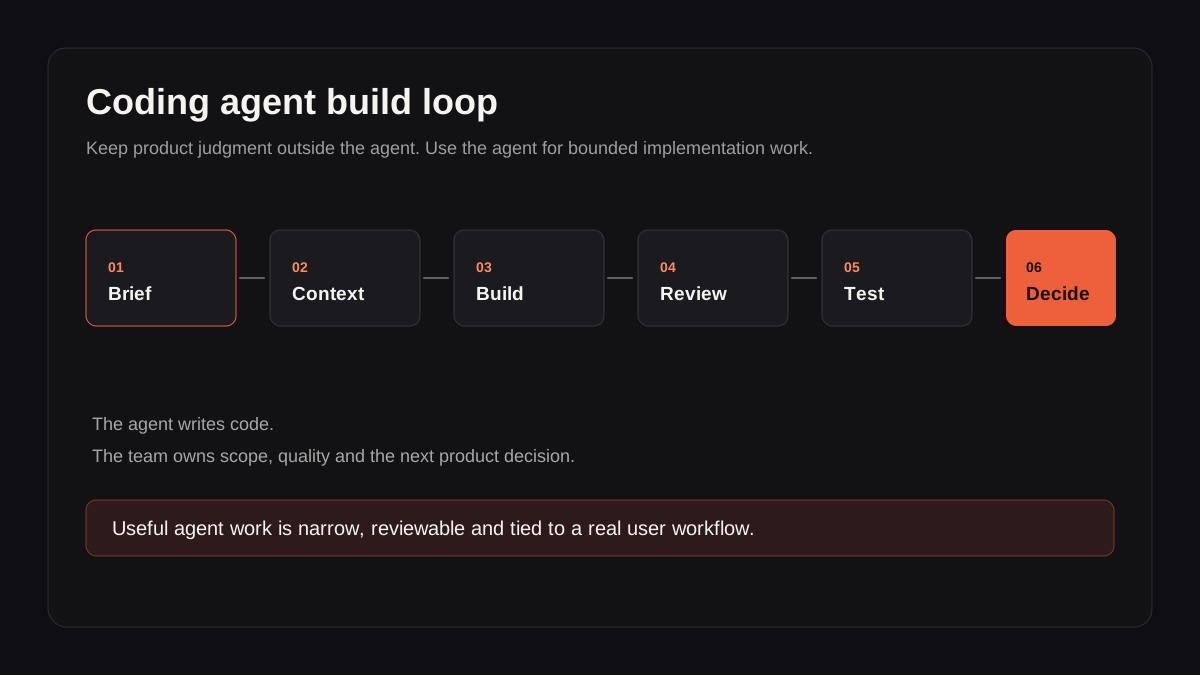
Coding agents are strongest when the task is narrow, reviewable and tied to a real user workflow.
What Coding Agents Actually Do
A coding agent is an AI system that can read code, modify files, run commands, inspect errors and iterate toward a requested software change. Tools such as Claude Code, Codex and similar agentic development environments go well beyond autocomplete. They can work across a codebase, reason about dependencies and make multi-file changes.
That power is useful for product teams because a lot of product work sits between strategy and engineering:
- Turning a rough workflow into a first usable screen.
- Connecting an API enough to test a real behavior.
- Refactoring prototype code into a maintainable structure.
- Adding instrumentation, tests, empty states and error handling.
- Exploring two product directions quickly enough to compare them.
The mistake is treating the agent as the product owner. It is better to treat it as a fast junior-to-mid implementation layer with broad recall and no reliable taste. It can produce a lot. It cannot know which tradeoff matters unless someone gives it that context.
Where Product Teams Should Use Coding Agents
Coding agents are strongest when the task is specific, reviewable and close to existing patterns in the codebase. They are weakest when the task requires unresolved product strategy, messy stakeholder alignment or high-risk architectural judgment.
| Product task | Good use of a coding agent | Bad use of a coding agent |
|---|---|---|
| Prototype a workflow | Build a clickable version of one user path | Generate an entire product from a vague idea |
| Add a feature | Implement a scoped behavior against existing patterns | Invent the product rules while coding |
| Improve quality | Add tests, loading states, error handling and logs | Assume generated code is production-ready |
| Explore options | Build two narrow alternatives for comparison | Keep generating variants instead of choosing |
| Integrate AI | Wire a model into a bounded workflow | Let the model define the workflow |
The pattern is simple: use coding agents where speed creates learning, not where speed hides uncertainty.
For example, if a founder wants to build an AI assistant for customer support, a coding agent can quickly create a prototype that ingests a sample ticket, drafts a reply and logs feedback. That is useful. Asking the agent to "build our AI customer support platform" is not useful. It skips the decisions that determine whether the product works: escalation rules, confidence thresholds, human review, data privacy, latency, cost and support team workflow.
The Product Work Starts Before the Prompt
Most failed agentic builds start with a prompt that is too close to the founder's excitement and too far from the user's task.
"Build me an AI product that helps teams understand customer feedback" sounds clear, but it is not a product instruction. It leaves the agent to invent the user, workflow, data model, interface, success criteria and failure states. The output may look impressive, but it will be built on guesses.
A better product brief answers five questions before the agent touches code:
- Who is the user?
- What job are they trying to complete?
- What input does the system receive?
- What output should it produce?
- What must happen when the output is wrong, slow or incomplete?
Those questions turn an AI idea into a product task. They also make the agent's work easier to review. If the brief says "the user can approve, edit or reject the generated reply before it is sent," then any implementation that sends automatically is wrong. Without that explicit rule, the agent might choose a risky behavior that looks efficient but damages trust.
This is why coding agents make product discipline more important, not less. They reduce implementation friction, so bad ideas get further before anyone notices.
A Practical Agentic Build Loop
The best workflow I have found is deliberately boring. It is not a giant prompt. It is a repeatable loop that keeps product judgment in control.
1. Define the smallest useful behavior
Start with one thing a user can do. Not a feature category, not a platform, not a "v1". One behavior.
Examples:
- Import one conversation and search it locally.
- Draft one customer-support response from one ticket.
- Generate one sleep-plan recommendation from one structured intake.
- Summarize one sales call and extract three follow-up tasks.
The smaller the behavior, the easier it is to test whether it matters.
2. Give the agent the right context
Good context includes the relevant files, existing patterns, constraints, user flow and acceptance criteria. Bad context is a motivational paragraph.
A useful agent prompt sounds more like this:
Add a feedback capture event to the generated-summary workflow. Follow the existing analytics helper in
src/lib/analytics.ts. Track whether the user accepts, edits or rejects the summary. Do not add a new analytics library. Add a focused test if there is an existing test pattern nearby.
That prompt constrains the work. It tells the agent what to do, what not to do and where local precedent lives.
3. Review like a senior engineer
Never merge agent output because it "works on screen." Review the diff. Look for invented abstractions, duplicate state, unhandled errors, accidental dependency changes, weak security assumptions and UI states that only work on the happy path.
For product teams without a senior engineer, this is the point where outside technical review is valuable. The agent can move fast, but someone has to know what quality looks like.
4. Test the actual workflow
Do not stop at unit tests. Run the user flow. Use bad inputs. Use empty data. Disconnect the API. Wait long enough to see loading states. Try the thing on a smaller viewport. Check what happens if the model returns a malformed answer.
AI products fail at the edges. Coding agents often generate the happy path first because the happy path is easier to infer.
5. Decide the next product move
After the workflow works, the next question is not "what else can the agent build?" It is "what did we learn?"
Sometimes the next move is more build. Sometimes it is discovery. Sometimes it is deleting half the feature because the small version already taught you that the direction is wrong.
Where Coding Agents Fail Product Teams
Coding agents fail in predictable ways.
They overbuild. If you ask for an admin dashboard, you may get filters, charts, settings, roles and a design system before you know whether anyone needs the dashboard.
They normalize weak UX. Generated interfaces often look polished enough to pass a quick demo, but miss the details that make a workflow usable: empty states, recovery paths, progressive disclosure, copy that reduces anxiety and controls that match user expectations.
They hide architectural debt. A coding agent can make a feature work by adding code in the easiest place. That may be fine for a prototype and dangerous for a product. Without review, the codebase accumulates hidden coupling.
They are poor at commercial judgment. They do not know whether a feature makes the product easier to sell, easier to support or easier to retain. They can only optimize for the task they were given.
These failures are manageable if the team treats agent output as a draft. They become expensive when the team treats it as a shortcut around thinking.
Coding Agents and AI Product Strategy
Coding agents are especially useful for AI product work because AI products require many small supporting pieces that are tedious but important: eval harnesses, prompt versioning, logging, feedback capture, latency handling, retry logic, fallbacks and review states.
The model call is rarely the product. The product is the workflow around the model.
For founders, this means the best use of a coding agent is often not to generate a shiny new AI interface. It is to harden the boring parts around the AI feature:
- Log model inputs and outputs safely.
- Add human approval before high-impact actions.
- Create deterministic fallbacks when model output is low confidence.
- Build a small evaluation set for regression testing.
- Separate product rules from prompt text.
- Add instrumentation so you know whether the feature saves time.
This connects directly to practical AI product strategy: decide what the system should decide, suggest, draft or ignore before you automate anything.
FAQ
What are coding agents?
Coding agents are AI development tools that can read code, edit files, run commands and iterate on software tasks. They go beyond autocomplete by working across a codebase and taking multi-step actions toward a defined implementation goal.
Should product managers use coding agents?
Product managers can use coding agents for prototyping, workflow exploration and technical scoping, but they should not treat generated code as automatically production-ready. The strongest use is pairing product clarity with technical review.
Can coding agents replace engineers?
No. Coding agents can accelerate implementation, but someone still needs to define the product, make architectural decisions, review quality, test behavior and own production reliability.
What is the best first task for a coding agent?
The best first task is a narrow, reviewable behavior: one workflow, one integration, one refactor or one testable improvement. Avoid asking the agent to build an entire product from a vague prompt.
How do coding agents fit into AI product development?
They are useful for turning scoped product decisions into working software: prototypes, eval tools, logging, prompt infrastructure, UI states and API integrations. They are least useful when the team has not yet decided what the AI should do for the user.
What to take from this
Coding agents are a serious advantage for product teams that already know how to make product decisions. They make it faster to test a workflow, harden a prototype and turn technical intent into code.
They are not a substitute for judgment. The better the brief, the better the agent. The better the review, the safer the output. The better the product thinking, the more useful the speed becomes.