You built a working prototype in an afternoon. A tool like v0, Bolt, or Lovable turned a description into a shareable, interactive demo. It felt like magic. You showed it to a few people. They got it immediately. Then you tried to make it real.
Suddenly the conversation shifts from “this is cool” to “how do we get it to work every time, handle edge cases, not embarrass us in front of a paying user, and live somewhere secure?” The magic evaporates. You realise you have a demo, not a product.
That gap between an AI-generated prototype and something you can ship without flinching is where most founders stall. Not because the AI isn’t good enough, but because the hard part was never the prototype. The hard part is product judgement, shipping discipline, and the boring engineering work that turns a proof-of-concept into a service real people can rely on. This article is about closing that gap, without hype.
The Prototype Trap
AI prototyping tools have collapsed the time from idea to clickable demo to hours. That changes expectations. Founders who’ve never built a product before start wondering why the whole thing can’t be built in a weekend. Non-technical PMs and stakeholders see a polished UI and assume the underlying logic is just as solid. It rarely is.
The trap is mistaking a prototype for a product. A prototype answers one question quickly: “Will someone understand this idea and find it valuable?” A product has to answer that question at scale, repeatedly, while your phone stays silent at night.
What AI demos come with, and what they don’t tell you:
- They look like production, but they typically have no error handling, no proper authentication, no monitoring, and data that lives in a demo environment or your browser.
- The UI generated from a prompt is often inconsistent for edge-case states. Loading spinners vanish, empty states aren’t designed, and error messages are generic or absent.
- The “backend” if any is a thin Node function or a mock, not the real data model, permissions, or integrations you’ll need.
- The generated code is often good enough to read, but not structured to be maintained by a team. Refactoring it into a real codebase takes discipline.
None of this is a reason to avoid AI prototyping. It’s a reason to be clear-eyed about what comes next. The prototype is where the conversation starts, not where the build ends.
When Prototyping Helps (and When It Slows You Down)
Prototyping with AI is most useful early, when ambiguity is high and the cost of being wrong is low. The moment you can put a rough version in front of a user or a stakeholder, you gain clarity faster than any requirements doc can give you.
Use AI prototypes when:
- You’re exploring whether a concept makes sense at all.
- You need a visual, functional artifact to align a cross-functional team.
- You want to test a user flow or interaction pattern without an engineer.
- You’re comparing two directions and need something concrete to debate.
Stop prototyping and start building when:
- You have enough signal that the idea is worth committing resource to.
- You need real user data, authentication, or security to get honest feedback.
- The feedback on the prototype is about real-world reliability, not concept clarity.
- The effort required to keep the prototype credible is distracting you from the real product.
I’ve watched founders spend weeks polishing an AI prototype to “prove the vision,” when they could have spent that time writing the thirty-line function that makes the first real user flow work end-to-end. Prototypes have diminishing returns. The better they look, the more they disguise the missing parts. A crisp prototype can feel more finished than a working backend with a spartan UI. That mismatch leads teams to underestimate the remaining work by orders of magnitude.
The Gap Between a Demo and a Product
The real distance from prototype to product is not about adding more features. It’s about making the thing dependable, understandable by other humans who have to maintain it, and survivable in the real world.
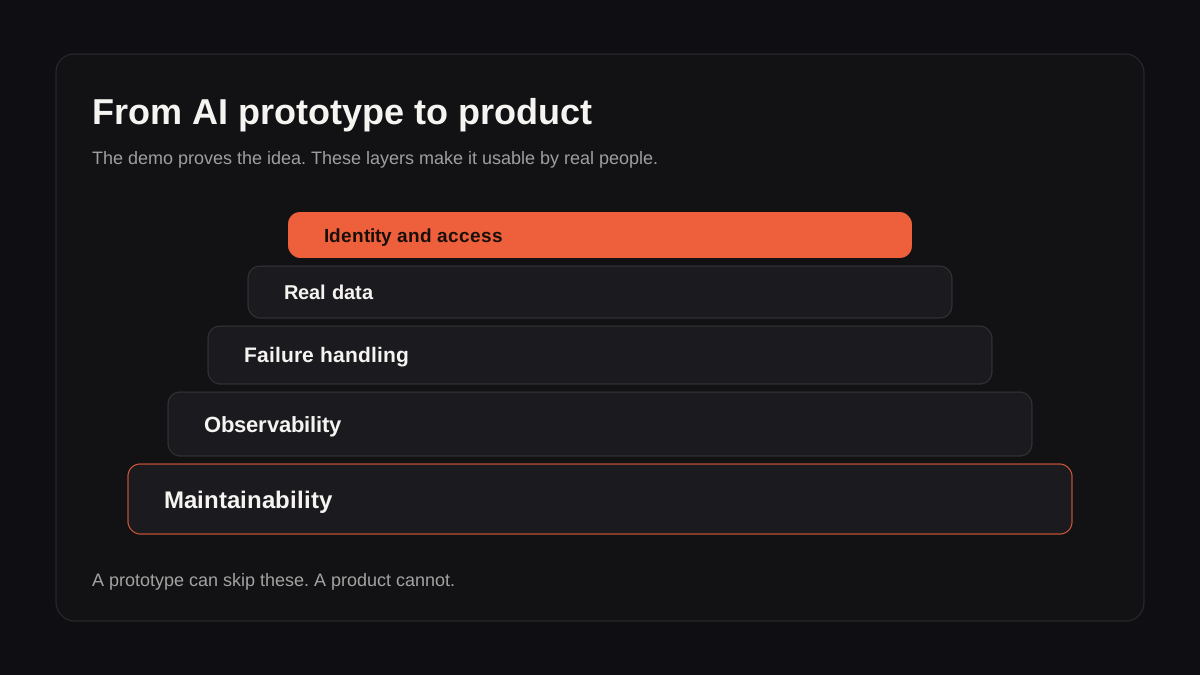
Here are the five layers most prototypes skip that an actual product needs:
| Production layer | What the prototype usually has | What the product needs |
|---|---|---|
| Access | One assumed user | Authentication, roles and permissions |
| Data | Mock records or browser state | Real schemas, persistence and data quality checks |
| AI behavior | One happy-path prompt | Guardrails, fallbacks, retries and review states |
| UX states | Polished default screen | Loading, empty, error and recovery states |
| Operations | No visibility | Logs, analytics, monitoring and support paths |
1. Identity and access. A prototype usually assumes one user, no logins, no permissions. A product must handle authentication, roles, team access, and all the edge cases of session management. It’s unglamorous but it’s where prototypes become platforms.
2. Data reality. AI prototypes often mock data or use a static set. As soon as you connect real databases, APIs, or user-generated input, you discover that the schema is wrong, the AI response parsing is brittle, and the state management is naive. You’ll spend real time getting the data layer right, not because the model can’t handle it, but because your system needs consistency that LLMs alone don’t guarantee.
3. Failure handling. In the prototype, the happy path works. The AI call times out, returns nonsense, or exceeds a token limit? Not your problem yet. In production, those failures will happen. You need retries, fallbacks, graceful degradation, and monitoring. A prototype that works in a controlled demo fails in unpredictable ways when real people use it at scale.
4. Observability. You can’t improve what you can’t see. Prototypes rarely log anything useful. Products need to know when the AI is making bad decisions, when latency spikes, and when a user is stuck. This requires instrumentation and alerting that don’t appear in a prompt-to-code generation.
5. Maintainability. The code an AI tool generates for a prototype is often a single large file or a messy component structure. Shipping a product means code another developer (or future you) can read, test, and change without breaking everything. That refactoring step is not optional. It’s the difference between a fragile toy and a system you can bet on.
The practical AI product strategy I’ve written about before (What Practical AI Product Strategy Actually Means for Founders) starts here: the four product-level questions you need to answer before you ship. What should the system decide, suggest, draft, or ignore? Where will it fail? How will you know it’s working? What is the smallest valuable version? The prototype didn’t answer those questions. It just showed you a possible shape. Now the product work starts.
How to Use Coding Agents to Cross the Gap
Coding agents are excellent for the messy middle work of hardening a prototype into a product, but founders often use them exactly the wrong way: they ask the agent to “add authentication” and get a brittle, non-standard solution tacked onto demo code. A better pattern is to use coding agents for bounded, repeatable tasks inside a defined architecture, not as the architect.
I’ve covered where coding agents fit in more depth in Coding Agents for Product Teams. For the prototype-to-product transition specifically, use them to:
- Scaffold the real project structure from the prototype code, separating concerns, setting up proper routing, state management, and component libraries.
- Write the first pass of error handling, retry logic, and loading states that the prototype omitted. An agent can quickly generate the boilerplate, but you then review it for correctness.
- Build out the observability hooks (logging, tracing, user feedback capture) that turn the black box into something you can monitor.
- Port the prototype UI into your production design system, ensuring consistency across every state and screen size.
Nowhere in that list is “write the entire application in one go.” The agent helps you accelerate each step of the hardening process, but you stay in control of the decisions. Product judgement means you know what to prompt and what to reject.
A practical workflow I’ve used: take the prototype code, strip out anything demo-specific, then task a coding agent with refactoring the core feature into a clean module with tests, error boundaries, and defined interfaces. It takes a fraction of the time it would take to rewrite from scratch, but the output is a codebase that can grow. The AI is a multiplier, not a replacement, for the skill of knowing what a production-quality feature actually needs.
What to Ship First When You’re Leaving Prototype Land
The ambition to turn the whole prototype into a feature-complete product is what kills momentum. Instead, identify the one real workflow a user can complete from start to finish, with real data, behind a login.
Choose your first slice by asking:
- What job does a user need to do right now that we can complete reliably?
- What’s the minimum set of integrations, permissions, and error paths required to not break trust on that one job?
- What’s the simplest interface that supports that workflow, even if it’s not the full prototype vision yet?
- How will we know if it works well enough (not perfectly) to ship to a handful of friendly users?
For an AI-heavy product, that first slice often means making the AI’s role much smaller than your demo. The prototype might have used the AI for everything, generating whole documents, answering open-ended questions. The shippable version might just suggest a draft, handle a narrow task, or flag an anomaly, because you can control the output and handle failure cleanly. Reliability matters more than range.
Build around failure. For every AI call, decide what the system does when the model is wrong, slow, or returns something unexpected. Show a fallback. Queue a retry. Surface a clear “not sure” state. The user must never be left staring at a broken interaction.
Once that slice works end-to-end for a couple of real users, you’ve moved from prototype to product. The rest is scaling, not reinvention.
FAQ
How do I know when my prototype is ready to become a product?
You know when the conversation has shifted from “does this idea make sense?” to “will this work reliably for my actual task?” If users ask whether they can use it for something real, you’ve got your signal. Don’t wait for the prototype to be perfect; start building the smallest real piece immediately.
What’s the biggest mistake founders make with AI prototypes?
Treating the prototype as the product and trying to ship it as-is. The generated code is almost never production-quality in terms of structure, security, or error handling. Shipping it directly leads to technical debt that compounds fast. The correct move is to treat the prototype as an input to a deliberate product build, not the build itself.
Can I use the same AI tools to build the product as I used to build the prototype?
Yes, but with a different approach. Use them to accelerate individual hardening steps: refactoring, writing tests, scaffolding production structure, and adding the missing production states. Don’t use them as a “turn demo into app” one-shot. The tool is less important than the process and the product thinking.
What if I’m not technical? How do I bridge this gap alone?
You can’t completely. At some point, you need an engineer, or you need to learn enough engineering to make good calls. AI tools let you go much further without an engineering background, but when you hit questions like authentication, database design, and production deployment, you either learn those skills or bring in someone who has them. The useful shift is speed: a technical partner can take your well-defined prototype and turn it into a product in days, not months.
Do I need to rebuild the whole prototype from scratch to get something production-ready?
Not usually. You can salvage the UI components and some logic, but expect to refactor the architecture, add missing infrastructure, and rewrite brittle integrations. It’s often faster to use the prototype as a visual and design reference, then build the product cleanly than to wrestle generated code into submission.
The Real Skill
Moving from an AI prototype to a product isn’t about finding a better tool. It’s about product judgement: knowing what to keep, what to rebuild, and what to leave out until you’ve earned the right to take on more complexity.
The best founders I’ve worked with treat the prototype as evidence enough to start real work. They don’t keep polishing it. They don’t mistake the AI’s speed for product readiness. They take the clarity the demo gave them and immediately shift to building something small, reliable, and quiet. Something a user can actually trust.
That’s the part the tools can’t do for you.